SpaceMonkey
Connection Method
Section titled “Connection Method”Shared Memory (via SpaceMonkey) — SpaceMonkey is a third-party telemetry bridge that enables DR Sim Manager to work with games that don’t have native DRSM support. SpaceMonkey captures telemetry from various games and outputs it through shared memory.
Setup Steps
Section titled “Setup Steps”1. Install SpaceMonkey
Section titled “1. Install SpaceMonkey”- Download the latest release of SpaceMonkey from GitHub.
- Follow the SpaceMonkey installation instructions for your desired game.
2. Configure SpaceMonkey Output
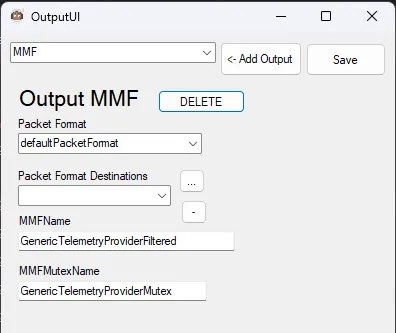
Section titled “2. Configure SpaceMonkey Output”In SpaceMonkey, configure the output settings:
- Output Type: Output MMF
- Packet Format: defaultPacketFormat
- MMFName: GenericTelemetryProviderFiltered
3. Filter Settings
Section titled “3. Filter Settings”- Default: noFilters
4. Connect to DR Sim Manager
Section titled “4. Connect to DR Sim Manager”- Launch SpaceMonkey.
- In SpaceMonkey:
- Select your Source/Game from the menu.
- Click the Initialize! button.
- In DR Sim Manager:
- Go to the source selection.
- Choose one of:
- SpaceMonkey Ground — for ground-based racing games
- SpaceMonkey Flight — for flight simulation games
Available Telemetry
Section titled “Available Telemetry”Telemetry quality depends on the game and the SpaceMonkey provider being used. Typically includes:
- Orientation: Pitch, Roll, Yaw
- Acceleration: G-forces
- Speed: Vehicle/aircraft speed
Telemetry Quality: Varies by game
Section titled “Telemetry Quality: Varies by game”Known Quirks
Section titled “Known Quirks”- Third-party tool: SpaceMonkey is not maintained by DR Sim Manager. Refer to SpaceMonkey’s documentation for game-specific setup.
- Two source options: Choose “SpaceMonkey Ground” for cars/vehicles or “SpaceMonkey Flight” for aircraft — this affects how the telemetry axes are interpreted.
Troubleshooting
Section titled “Troubleshooting”No telemetry data
Section titled “No telemetry data”- Verify SpaceMonkey is running and initialized.
- Check that the MMFName is
GenericTelemetryProviderFiltered. - Ensure you selected the correct source type (Ground vs Flight) in DR Sim Manager.
- Try restarting both SpaceMonkey and DR Sim Manager.