No Limits 2
Connection Method
Section titled “Connection Method”TCP — No Limits 2 sends telemetry data over TCP when launched with the appropriate command-line arguments.
- Default Port:
15151
Setup Steps
Section titled “Setup Steps”Non-Steam Version
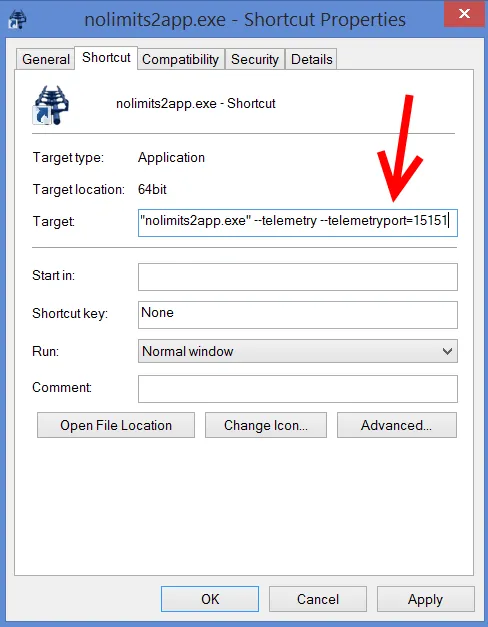
Section titled “Non-Steam Version”- Create a shortcut to the
nolimits2app.exefile. - Right-click it and choose Properties.
- In the Target field, add the following parameters:
--telemetry --telemetryport=15151
Steam Version
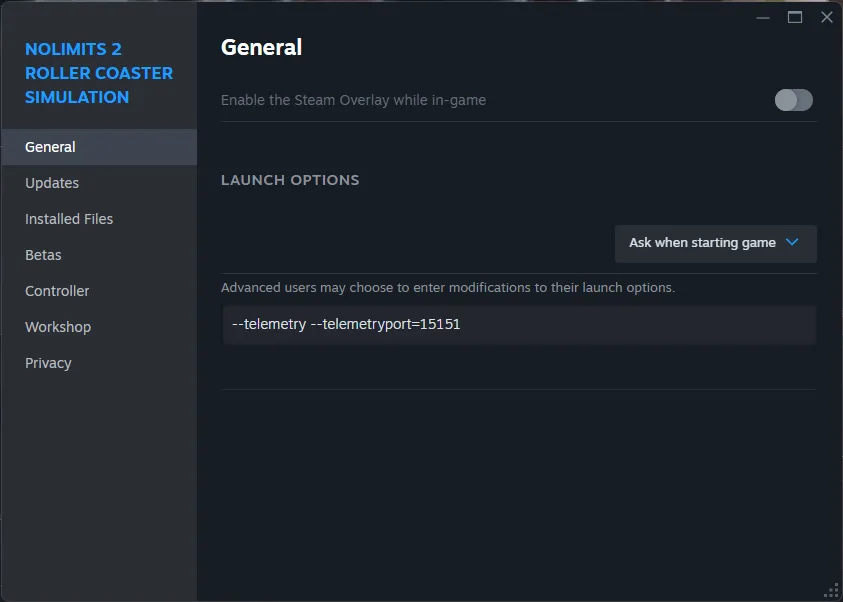
Section titled “Steam Version”- In your Steam library, right-click NoLimits 2 Roller Coaster Simulation.
- Select Properties.
- Click Set Launch Options… and add:
--telemetry --telemetryport=15151
Available Telemetry
Section titled “Available Telemetry”- Orientation: Pitch, Roll, Yaw
- Acceleration: Full 3-axis G-forces
- Speed: Coaster speed
Telemetry Quality: ★★★★☆
Section titled “Telemetry Quality: ★★★★☆”Recommended Starting Settings
Section titled “Recommended Starting Settings”Roller coasters produce extreme forces:
- Primary Cue Gain: 30–60% (coasters produce very high G-forces)
- Smoothing: Low
- Washout: High — sustained forces during loops and turns
- Safety Limits: Strongly recommended
Troubleshooting
Section titled “Troubleshooting”No telemetry data
Section titled “No telemetry data”- Verify the launch options include
--telemetry --telemetryport=15151. - Make sure you are riding a coaster (not in the editor or menus).
- Confirm you have the full version (not the demo).
- Restart both No Limits 2 and DR Sim Manager.