Richard Burns Rally
Connection Method
Section titled “Connection Method”UDP — Richard Burns Rally (with the NGP mod) sends telemetry data over UDP.
- Default IP:
127.0.0.1 - Default Port:
6767
Setup Steps
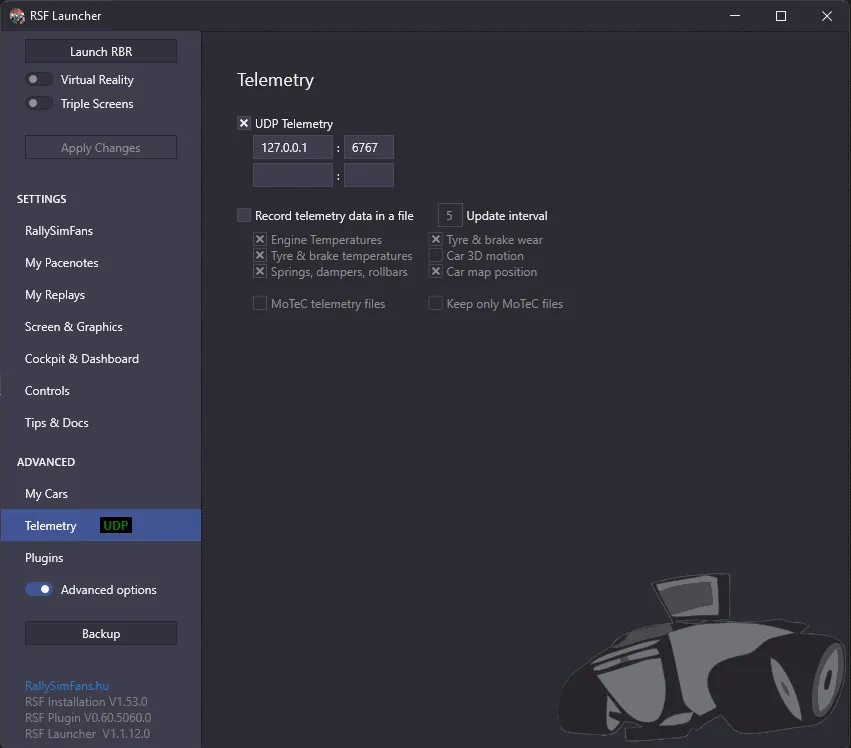
Section titled “Setup Steps”- Open the RSF Launcher.
- Click Advanced Options (toggle it on if it is off).
- In the left panel, go to Telemetry under the “Advanced” section.
- Enable UDP Telemetry by checking the box.
- Set the IP Address to
127.0.0.1(for local machine). - Set the Port to
6767. - Click Apply Changes.
Available Telemetry
Section titled “Available Telemetry”- Orientation: Pitch, Roll, Yaw
- Acceleration: G-forces
- Speed: Vehicle speed
- RPM: Engine RPM
- Gear: Current gear
- Suspension: Wheel data
Telemetry Quality: ★★★★☆
Section titled “Telemetry Quality: ★★★★☆”Recommended Starting Settings
Section titled “Recommended Starting Settings”Rally driving produces dramatic forces:
- Primary Cue Gain: 50–80%
- Smoothing: Medium
- Washout: Medium to high
Known Quirks
Section titled “Known Quirks”- NGP mod required: The vanilla (unmodded) version of RBR does not support UDP telemetry. You need the Next Generation Physics (NGP) mod.
- RSF Launcher: The Rally Sim Fans launcher provides the easiest way to configure telemetry.
Troubleshooting
Section titled “Troubleshooting”No telemetry data
Section titled “No telemetry data”- Verify UDP Telemetry is enabled in the RSF Launcher.
- Check IP and port settings.
- Ensure you are driving a rally stage.
- Restart both RBR and DR Sim Manager.