F1 25
Connection Method
Section titled “Connection Method”UDP — F1 25 sends telemetry data over UDP. You need to enable this in the game’s Telemetry Settings.
- Default IP:
127.0.0.1 - Default Port:
20777 - Recommended Send Rate: 60 Hz
Setup Steps
Section titled “Setup Steps”- Launch F1 25.
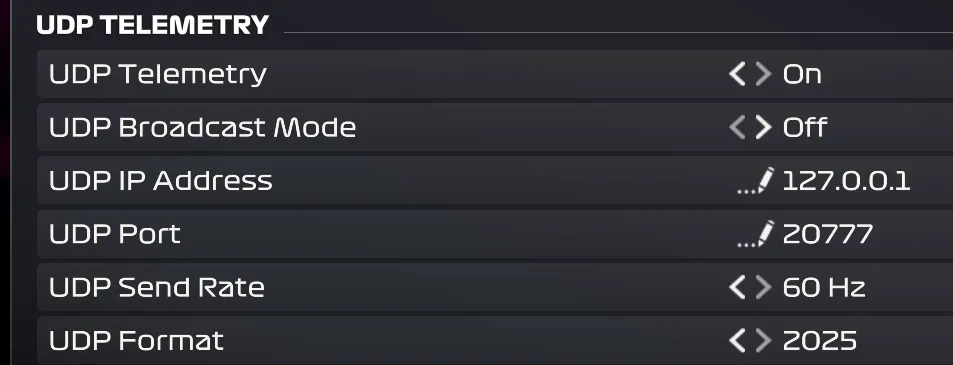
- Go to Options > Settings > Telemetry Settings.
- Select the following settings:
- UDP Telemetry: On
- UDP IP Address:
127.0.0.1 - UDP Port:
20777 - UDP Send Rate: 60Hz
- UDP Format: 2025
- Save the settings.
- In DR Sim Manager, select F1 25 from the Source list and click Start Motion.
Available Telemetry
Section titled “Available Telemetry”F1 25 provides excellent telemetry across multiple packet types:
- Orientation: Pitch, Roll, Yaw
- Acceleration: G-forces (lateral, longitudinal, vertical — converted to m/s²)
- Velocity: Full 3-axis local velocity
- Angular Velocity: Full 3-axis rotation rates
- Speed: Vehicle speed
- RPM: Engine RPM
- Gear: Current gear (-1=Reverse, 0=Neutral, 1-8=Forward gears)
- Suspension: 4-wheel position and velocity (FL, FR, RL, RR)
- DRS: DRS status (on/off)
Telemetry Quality: ★★★★★
Section titled “Telemetry Quality: ★★★★★”F1 25 provides high-quality motion data with separate packets for basic motion, extended motion (including suspension and angular velocity), and car telemetry (RPM, gear). DR Sim Manager combines all three packet types for the most complete picture.
Recommended Starting Settings
Section titled “Recommended Starting Settings”F1 cars produce very high G-forces. Start conservatively:
- Primary Cue Gain: 40–70%
- Smoothing: Low to medium
- Washout: Medium to high — F1 cars sustain high lateral G through long corners
Known Quirks
Section titled “Known Quirks”- Multiple packet types: F1 25 sends several different UDP packet types. DR Sim Manager listens for Motion (packet ID 0), Motion Ex (packet ID 13), and Car Telemetry (packet ID 6). Only these three contain data relevant for motion platforms.
- Session time deduplication: DR Sim Manager uses the session timestamp to skip duplicate motion packets that arrive with the same time value.
- UDP Format must be “2025”: If you set the UDP Format to an older year (2023, 2024), the packet structure will be different and DR Sim Manager may not parse data correctly for this source. Use the F1 2023 or F1 2024 sources for those formats.
- Interpolation enabled: DR Sim Manager applies interpolation between F1 25 data updates for smoother motion at higher output rates.
Using with Other Telemetry Apps
Section titled “Using with Other Telemetry Apps”If you run other telemetry apps (like SimHub, CrewChief, or dashboards) alongside DR Sim Manager, they typically listen on the same UDP port. You can only have one app listening on port 20777 at a time. Options:
- Use the other app’s forwarding feature to relay data to DR Sim Manager on a different port.
- Use only DR Sim Manager for motion and configure the other app to use a different data source.
Troubleshooting
Section titled “Troubleshooting”No telemetry data
Section titled “No telemetry data”- Verify UDP Telemetry is set to On in the game’s Telemetry Settings.
- Confirm the IP Address is
127.0.0.1and Port is20777. - Make sure UDP Format is set to 2025.
- You must be in a driving session (not in menus or watching replays).
- Check Windows Firewall — allow the game through the firewall for UDP.
- Restart both F1 25 and DR Sim Manager.
Motion works but RPM/Gear are missing
Section titled “Motion works but RPM/Gear are missing”- RPM and gear come from a separate Car Telemetry packet (packet ID 6). Ensure the game is fully loaded into a session. These values appear once you start driving.
Telemetry data from other F1 games
Section titled “Telemetry data from other F1 games”- F1 2023: Use the F1 23 source (different packet format)
- F1 2024: Use the F1 24 source
- Do not use the F1 25 source with older F1 games — the packet structures are different.